 JSKAPPS
Loudness Levelling: Why Dialogue Is Quiet, Ads Are Loud, and Volume Cannot Fix It
Tanmoy Sambhav · August 26, 2026
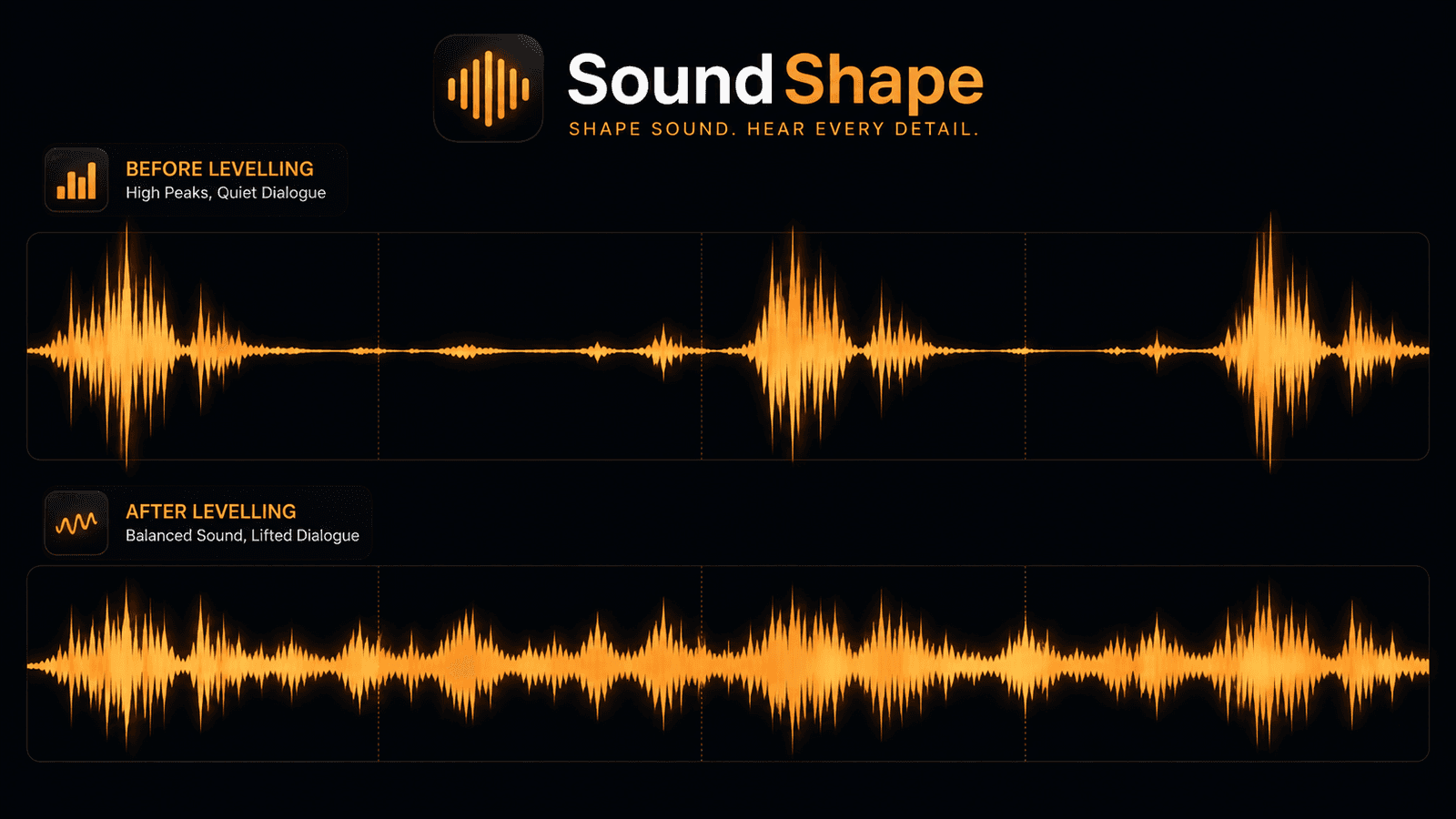
It is late. You are watching something with headphones on, and the two people on screen
are murmuring. You turn it up. You turn it up again. You are now three notches from
maximum and still leaning in.
Then the scene changes, or an advert starts, and you physically flinch while diving for
the volume key.
You have almost certainly blamed your headphones, your laptop, or the mix. It is none of
them. It is dynamic range, and volume is structurally the wrong tool for it.
The distance is the problem, not the level
Dynamic range is the gap between the quietest and loudest parts of a piece of audio.
Film and television have a lot of it deliberately — it is what makes a whisper feel
intimate and an explosion feel enormous. That is a wonderful property in a cinema, where
the quiet parts are still above the room's noise floor and the loud parts have somewhere
to go.
Your situation is different. There is traffic outside, a fan running, and headphones with
a hard ceiling. The whisper falls under the noise floor and the explosion hits the
ceiling.
Volume moves everything together. Raise it until dialogue is comfortable and the loud
parts become painful; lower it until the loud parts are comfortable and the dialogue
vanishes. There is no setting that satisfies both, because a single multiplier cannot
change the distance between two things. It can only move them as a pair.
Advertising makes it worse on purpose. Advertisements are mastered far closer to the
ceiling than the programme they interrupt, because loud is attention. Even where
broadcast loudness regulations apply, they govern averages, and there is plenty of room
inside an average.
What levelling actually does
Loudness levelling continuously measures how loud the audio is and adjusts gain to move
it towards a target. Quiet passages are lifted; loud ones are eased down. The distance
between them shrinks, which is exactly the thing volume cannot do.
The important word is continuously. This is not a fixed setting applied once; it is a
control loop reacting several times a second. That has consequences worth understanding
before you turn it up:
- It needs a moment to react. A sudden loud transient gets through before the loop
catches it. Fast reaction sounds jumpy; slow reaction lets things slip through. Any
real implementation is a compromise between those. - It cannot invent detail. Lifting a quiet passage lifts everything in it, including the
room hiss. On a genuinely noisy recording you will hear the noise floor breathe. - It changes the intent. A composer meant that swell to be overwhelming. Levelling makes
it less so. For dialogue at midnight this is the entire point; for a piece of music you
love it may be vandalism.
Levelling, compression, and equalisation are three different jobs
These get conflated constantly, and the distinction is the useful part:
| What it changes | Reacts to the signal? | Use it when | |
|---|---|---|---|
| Equaliser | Balance between frequencies | No — fixed curve | Sound is too dull, too boomy, or speech is unclear |
| Limiter | Peaks only, at the ceiling | Yes, very fast | You are amplifying and must not clip |
| Loudness levelling | Overall level, continuously | Yes, over seconds | Loud and quiet parts are too far apart |
An equaliser is a fixed shape: 2 kHz is always +3 dB, whatever is playing. Levelling
changes moment to moment based on what it hears. This is why an equaliser cannot fix the
dialogue problem — the dialogue is not the wrong shape, it is in the wrong place
relative to the rest.
A limiter is levelling's fast cousin, guarding the ceiling in milliseconds. In
JSK SoundShape a limiter is permanently in the
chain, so boosting a tab gets louder without clipping — that part is free and always on.
Levelling is the Pro feature, and it is a genuinely different thing: the limiter stops
disasters, levelling shapes the whole listening experience.
Setting it without ruining your music
Levelling in SoundShape is a strength control, not a switch, and that is deliberate — the
right amount is entirely dependent on what you are listening to. A practical starting
point:
Spoken content — lectures, podcasts, interviews: 70–100%. Dynamic range is doing you
no favours here. Nobody wants an artistically quiet passage in a conference talk. Go
high; you will stop touching the volume entirely.
Film and television: 40–60%. Enough to bring dialogue up out of the score without
flattening the thing you are watching for. Combine with night mode, which lifts
dialogue and restrains peaks together.
Music: 0–20%, usually 0. A mastering engineer already made these decisions with better
monitoring than you have. The main exception is a mixed playlist of wildly different
sources — old rips next to modern masters — where a little levelling saves you riding the
volume between tracks.
Video calls: leave it off. Conferencing platforms already apply aggressive automatic
gain control. Adding a second control loop on top gives you two systems fighting, which
sounds like pumping.
Because SoundShape saves settings per site, you set this once per site and never think
about it again — 90% on your lecture platform, 50% on a film site, 0% on your music
service.
How to tell whether it is helping
Two tests, both quick:
Hold to compare. Hold the compare button to hear the tab entirely unprocessed. Your
ears adapt to a processed signal within about a minute and then insist it was always that
way. Only an immediate A/B tells the truth.
The quiet-passage test. Find the quietest moment in the material and listen to it
processed. If you can hear the noise floor rising and falling around the speech, you have
gone too far — back the strength off until it settles. This is the failure mode of every
levelling system, and hearing it once teaches you where your ceiling is.
The honest limits
Three things worth stating plainly:
It cannot fix a bad recording. If the dialogue was captured under the music at the
mixing stage, the information is gone. Levelling raises whatever is there, including the
music sitting on top of it.
It is not the same as broadcast loudness normalisation. Standards like EBU R128 target
a fixed level across an entire programme, measured offline before delivery. This runs live,
on whatever your browser happens to be playing, with no knowledge of what comes next.
It cannot run on DRM-protected audio — nor can any other processing, from any
extension. Sites that encrypt their audio are unreachable by design. SoundShape names that
cause rather than leaving you to wonder why a slider stopped mattering.
Worth paying for?
Straight answer: it depends entirely on what you watch. Someone who consumes lectures and
films in a browser at night will stop reaching for the volume key, and that is a genuine
daily improvement. Someone who mainly listens to well-mastered music should leave
levelling at zero and keep the free tier, which has the complete equalizer, the 300%
booster and per-site profiles with no account at all.
We would rather tell you that than sell you something you will turn off.
Loudness levelling is part of Pro in
JSK SoundShape, alongside the parametric EQ,
headphone correction, night mode and crossfeed. There is a 14-day trial with no card. Full
control reference in the
documentation.
About this tool
JSK SoundShape