 JSKAPPS
Backtest your binary-options strategy — the right way
Plug any strategy into a realistic simulation with martingale, payout, and session rules — so you know how an idea actually performs before you risk a cent.
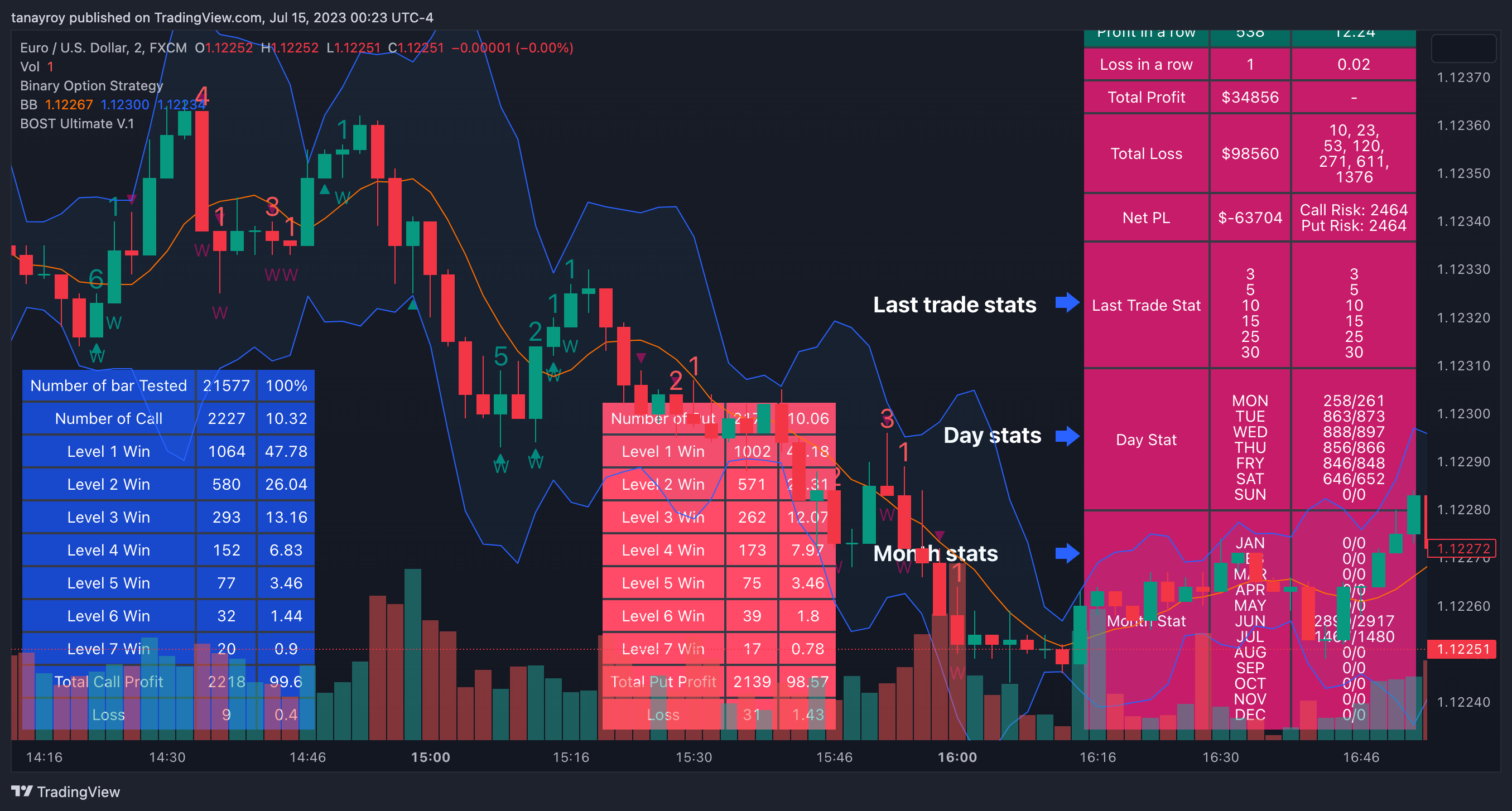
Binary Option Ultimate Backtester turns TradingView into a proper testing lab for binary-options trading. Instead of eyeballing a strategy, you connect its Call/Put signals and let the tool simulate every trade against historical candles — with the money-management rules you actually use.
It's built for traders who want honest answers:
Bring your own strategy. Any Pine strategy can feed its signals in with a single connector line — test your edge, not a fixed preset.
Model real conditions. Set your broker's payout %, starting stake, holding period, trading sessions and date range.
Stress-test recovery systems. Up to 15 martingale levels with SAME, OPPOSITE, Follow-Candle-Color and Opposite-Color progressions.
See the truth in the numbers. Win rate and streaks across your last 3–30 trades, plus daily and monthly breakdowns.
How trades are simulated: a position opens on the next candle after a signal, entered at the open. Calls win on a green candle, puts win on a red candle. Only one trade runs at a time — signals during an open trade are ignored — so results stay clean and realistic. You can view the original listing and reviews on TradingView.
How it works
Get access
Buy, enter your TradingView username, and we add you to the invite-only script within 24 hours.
Connect your strategy
Add one connector line to any Pine strategy so its Call/Put signals feed the backtester: Signal = is_call ? 1 : is_put ? -1 : 0 and plot(Signal, title="🔌Connector🔌", display=display.none)
Set your trade rules
Pick Call/Put/Both, holding period, payout %, martingale levels, and your sessions and date range.
Read the results
Review win rate, streaks, and daily/monthly breakdowns across your recent trades and full history
Features
Plug in any strategy
Feed any Pine strategy's signals in with a single connector line. Test your own ideas, not someone else's presets.Feed any Pine strategy's signals in with a single connector line. Test your own ideas, not someone else's presets.
Call, Put, or both
Model exactly how you trade — calls, puts, or both directions, with a holding period you set in candles.
Martingale up to 15 levels
Stress-test recovery systems with SAME, OPPOSITE, Follow-Candle-Color, or Opposite-Color progressions — per strategy or globally.
Realistic payouts & staking
Set your broker's payout % and starting stake so the equity curve reflects your real conditions.
Session & date filters
Backtest only the hours and dates you actually trade, and auto-stop on consecutive wins or losses.
Deep win/loss stats
Performance across your last 3, 5, 10, 15, 25 and 30 trades, plus daily and monthly breakdowns.
Pricing
No account needed — pay now and we'll email you a link to set a password and access your purchase. Already have an account?
1 Year
$10.00once
1 year of access
15-day free trial
Lifetime
$99.00once
Lifetime access
15-day free trial
Access is set up manually. Access is added to your TradingView account within 24 hours of purchase. Please double-check the TradingView username you enter at checkout — it's case-sensitive.
Frequently asked questions
What is this tool?+
An invite-only TradingView (Pine) indicator that backtests binary-options strategies against historical data using realistic trade-management rules.
How do I get access after paying?+
At checkout you enter your TradingView username; we add invite-only access to that account, usually within 24 hours. You'll see the status in your dashboard under Purchases.
How do I connect my own strategy?+
Add one connector line so your strategy plots its signal (Call = 1, Put = −1, none = 0). Any strategy that can output a buy/sell signal works.
How are trades simulated?+
A trade opens on the candle after the signal, entered at the open. Calls win on green candles, puts on red. Only one trade runs at a time; signals during an open trade are skipped.
Which markets and timeframes does it work on?+
Any symbol and timeframe on TradingView — you decide what to test.
Does it place trades or guarantee profits?+
No. It's a backtesting and analysis tool only. Past performance doesn't guarantee future results; trading binary options carries significant risk.
What's the difference between Lifetime and 1 Year?+
Lifetime is a one-time payment for permanent access. 1 Year gives 12 months of access for a lower price; renew by purchasing it again.
I entered the wrong TradingView username — what now?+
If your order shows Action needed, just correct your username from the Purchases page and it re-enters our queue.
Ready to test your edge?
Get invite-only access and start validating strategies today. Choose a lifetime license or a low-cost yearly pass.